CapCut Effects, Templates & Trends

Discover creative ways to make your videos stand out with CapCut effects, transitions, templates, text animations, captions, audio techniques, and trending video styles. Follow our tutorials to recreate popular edits and add professional-looking effects to your videos.

Capcut Green Screen Tutorial

How to use Green Screen on CapCut – Detailed Guide in 2026

You’re about to learn how to perform green screen editing on CapCut in a simple manner. This feature is a great video editing talent. Follow the step-by-step instructions. Recently, green screens have become ubiquitous in video editing. You’ll ultimately see some of these adjustments on social media if you read through the feed for a

How to use Green Screen on CapCut – Detailed Guide in 2026 Read More »

How to add music in Capcut

How to Add Music to CapCut? – Detailed Guide in 2026

Adding music to your videos can significantly enhance their appeal and emotional impact. In this tutorial, we’ll walk you through how to include your own music in CapCut, whether you’re using an iPhone or Android device. Music is often overlooked but plays a vital role in setting the tone and enhancing the overall viewer experience.

How to Add Music to CapCut? – Detailed Guide in 2026 Read More »

Velocity Edit Capcut

How to do Smooth Velocity Edit on CapCut in 2026? New Easy to Use Guide

A velocity edit is a video editing technique where different parts of a video are sped up or slowed down to create dynamic effects. This method is popular for adding artistic flair or aligning with trends, such as the viral TikTok velocity edit trend, which combines sped-up and slowed-down clips seamlessly. Velocity edits are ideal

How to do Smooth Velocity Edit on CapCut in 2026? New Easy to Use Guide Read More »

Custom fonts using CapCut

How to Download and Add Best Custom Fonts on CapCut in 2026?

CapCut is an easy-to-use video editing application with simple interface that provides many features and functionalities. Its ability to import custom fonts, which will aid in enhancing the visual appeal of your clips. Also, it adds a touch of originality and creativity to your projects, is one of its notable features. We will show you

How to Download and Add Best Custom Fonts on CapCut in 2026? Read More »

How to get and use CapCut Templates

How to Find and Use New Trend Templates using CapCut in 2026?

Amazingly quickly, the free video editing app CapCut has trended worldwide. However, if you’re wondering what makes CapCut standout in addition to its robust editing features, the answer is unquestionably the outstanding templates it offers. These templates give people’s works limitless modification options by fusing high-quality music and filter effects. How to get and apply

How to Find and Use New Trend Templates using CapCut in 2026? Read More »

How to add music from Spotify or YouTube into CapCut?

In this detailed tutorial we will show you how you can add music to your CapCut videos directly from Spotify or YouTube. There are two methods and we will explore each option in this detailed guide. Due to the ability to combine high-caliber videos with music to create a fantastic package, video editing has grown

How to add music from Spotify or YouTube into CapCut? Read More »

Sync audio with video

How to sync music to your videos automatically using Capcut?

Video watching has become a popular kind of entertainment, and we’re all attempting to make clips and reels to spread joy and excitement. There are several video editors available, but CapCut, developed by ByteDance, stands out due to its adaptability and interoperability. It’s crucial to sync the music rhythm with the visual if you’ve created

How to sync music to your videos automatically using Capcut? Read More »

SRT file

How to Export and Save Capcut Captions/Subtitles to SRT/TXT

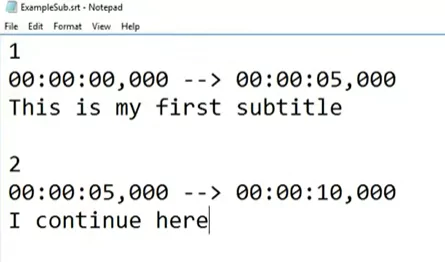
You might want to export the auto captions from Capcut into Premiere, Resolve, or any other editing application that supports .SRT files. You can download the captions from Capcut into SRT and TXT format using simple online tools. Read here about How to Automatically Add Captions and Subtitles in CapCut? Why Subtitles are important for

How to Export and Save Capcut Captions/Subtitles to SRT/TXT Read More »

Capcut slowed and Reverb Effect

How to reverb song using Capcut? – Slowed music effect

A reverb effect, often known as reverberation, is an audio effect used to imitate prolongation in a sound stream. It can be produced physically, using echo chambers, or digitally, using audio signal processing. It is a kind of music in which the songwriter alters the song’s tempo and frequently uses the reverb effect to add

How to reverb song using Capcut? – Slowed music effect Read More »

Creating auto captions on Capcut

How to Automatically Add Captions and Subtitles in CapCut?

When it comes to reaching a bigger audience and, notably, accessibility, subtitles are crucial whether they are used in Storytelling, vlogs on YouTube, or corporate films. CapCut is an editing tool that you can use manually or automatically to do this work. It is accessible for iOS and Android. Here’s how to use the app

How to Automatically Add Captions and Subtitles in CapCut? Read More »

How to add audio and sound effects

How to Add Audio and Sound Effects in CapCut Video?

A video will become significantly better when sound effects are included. Additionally, many video editors come with a sound editor that may be used to apply sound effects to the sound, such as adding audio reverb, increasing the bass, or altering the pitch. Capcut is a powerful video editor which comes with lot of sound

How to Add Audio and Sound Effects in CapCut Video? Read More »

Scroll to Top